

If you’re starting photography, focus first on mastering your camera’s basic settings (aperture, shutter speed, ISO) and composition techniques like the rule of thirds. Begin with natural light, practice often, and don’t worry about expensive gear—skill matters more than equipment.
Learning your camera and reading its manual is one of the most underrated but powerful steps in photography. Here’s how to approach it so it feels less like homework and more like unlocking a secret language:

📖 How to Learn Your Camera (Manual Included)
- Treat the Manual as a Map
- Don’t read it cover to cover—skim it like a guidebook.
- Flag sections on exposure modes, focus systems, and custom settings.
- Keep it nearby when practicing; it’s a reference, not a novel.
- Break Down Features One at a Time
- Day 1: Aperture controls → practice depth of field.
- Day 2: Shutter speed → freeze vs blur motion.
- Day 3: ISO → noise vs brightness.
- Day 4: Autofocus modes → single, continuous, manual.
- Day 5: Metering modes → spot, center-weighted, evaluative.
- Use the Manual to Decode Symbols
- Those cryptic icons (sun, mountain, flower) suddenly make sense when explained.
- Learn what each button does—no more guessing mid-shoot.
- Practice With Purpose
- Pick one feature from the manual, then shoot only with that in mind.
- Example: After reading about exposure compensation, spend an hour adjusting ±EV in different light.
- Build Muscle Memory
- Reading tells you what the button does.
- Practice tells you where it is without looking.
- The goal: operate your camera like an extension of your hand.
- Keep Notes
- Jot down quirks: “My camera underexposes in backlight—compensate +1 EV.”
- Over time, you’ll build your own personal manual that’s more useful than the factory one.
🧭 Philosophy
Would you like me to design a step‑by‑step “manual study plan” (like a 7‑day routine) so you can systematically learn your camera without overwhelm?

📸 Beginner Photography Guide
- Essential Camera Settings
- Aperture (f-stop): Controls depth of field. Wide aperture (f/1.8) = blurry background; narrow aperture (f/11) = sharp background.
- Shutter Speed: Determines motion blur. Fast (1/1000s) freezes action; slow (1/30s) captures motion trails.
- ISO: Adjusts sensitivity to light. Low ISO (100–200) = clean image; high ISO (1600+) = brighter but grainy.
- Composition Basics
- Rule of Thirds: Place your subject along grid lines for balance.
- Leading Lines: Use roads, fences, or rivers to guide the viewer’s eye.
- Framing: Shoot through windows, arches, or foliage to add depth.
- Symmetry & Patterns: Highlight repetition for striking visuals.
- Lighting Tips
- Golden Hour: Shoot during sunrise or sunset for soft, warm tones.
- Avoid Harsh Noon Sun: It creates strong shadows; use shade or diffusers.
- Experiment Indoors: Use lamps or natural window light for portraits.
- Gear for Beginners
- Camera: Entry-level DSLR or mirrorless (Canon EOS Rebel, Sony Alpha series).
- Lens: A 50mm prime lens is affordable and versatile.
- Tripod: Helps with stability for long exposures or low light.
- Smartphones: Modern phones have excellent cameras—practice composition before upgrading gear.
- Practice & Growth
- Shoot Daily: Even mundane subjects help you learn.
- Experiment: Try portraits, landscapes, street photography.
- Review & Edit: Use free software like Lightroom Mobile or Snapseed.
- Learn from Others: Study photos you admire and analyze why they work.
⚠️ Common Beginner Mistakes
- Relying too much on auto mode—learn manual settings.
- Over-editing photos—keep adjustments subtle.
- Ignoring background clutter—always check surroundings.
- Buying expensive gear too early—skills matter more than equipment.
Would you like me to create a step-by-step 30‑day beginner photography challenge so you can practice these skills systematically?
📸 30-Day Beginner Photography Challenge
Week 1: Getting Comfortable with Your Camera
- Day 1: Take 10 photos of everyday objects in auto mode.
- Day 2: Experiment with aperture—shoot the same subject at f/2.8, f/5.6, and f/11.
- Day 3: Practice shutter speed—capture a moving subject at 1/30s, 1/250s, and 1/1000s.
- Day 4: Adjust ISO—shoot indoors at ISO 100, 800, and 1600.
- Day 5: Learn the rule of thirds—photograph a subject off-center.
- Day 6: Try symmetry—find reflections or balanced patterns.
- Day 7: Review your week’s shots and note what you liked most.
Week 2: Exploring Light
- Day 8: Shoot during golden hour (sunrise or sunset).
- Day 9: Capture shadows at midday.
- Day 10: Use window light for a portrait.
- Day 11: Experiment with backlighting—subject in front of the sun or lamp.
- Day 12: Try night photography—streetlights, neon signs, or stars.
- Day 13: Use artificial light (lamp, flashlight) creatively.
- Day 14: Compare natural vs artificial lighting in similar shots.
Week 3: Composition & Creativity
- Day 15: Use leading lines (roads, fences, paths).
- Day 16: Frame your subject (shoot through doors, arches, foliage).
- Day 17: Capture patterns or textures.
- Day 18: Shoot from a low angle.
- Day 19: Shoot from a high angle.
- Day 20: Try minimalism—one subject against a clean background.
- Day 21: Capture candid street photography (respect privacy).
Week 4: Storytelling & Editing
- Day 22: Take a series of 3 photos that tell a story.
- Day 23: Capture emotion in a portrait.
- Day 24: Photograph movement (sports, dancing, traffic).
- Day 25: Try black-and-white photography.
- Day 26: Edit your photos using free apps (Snapseed, Lightroom Mobile).
- Day 27: Re-shoot one of your earlier challenges with improved technique.
- Day 28: Create a photo essay of 5 images on a theme (e.g., “Morning Routine”).
- Day 29: Share your best photo with friends or online for feedback.
- Day 30: Reflect—compare Day 1 vs Day 30 shots and note your progress.
👉 By the end of this challenge, you’ll have practiced technical skills, creative composition, and storytelling—the three pillars of photography.
🎯 Photography Technical Drills (One Setting at a Time)
Aperture (Depth of Field)
- Drill 1: Place a subject (like a coffee mug) on a table.
- Shoot at f/2.8 → background blurry.
- Shoot at f/8 → background sharper.
- Shoot at f/16 → everything sharp.
- Goal: Notice how aperture changes background separation and focus.
Shutter Speed (Motion Control)
- Drill 2: Photograph moving water (fountain, sink, or river).
- Shoot at 1/1000s → water frozen.
- Shoot at 1/60s → slight blur.
- Shoot at 1/5s → silky smooth trails.
- Goal: See how shutter speed controls motion blur.
ISO (Light Sensitivity)
- Drill 3: Shoot indoors with steady lighting.
- ISO 100 → clean, dark image.
- ISO 800 → brighter, slight grain.
- ISO 3200 → very bright, noticeable noise.
- Goal: Understand trade-off between brightness and image quality.
Focus Modes
- Drill 4: Switch between manual focus and auto focus.
- Photograph a subject with cluttered background.
- Try locking focus on the subject manually, then let auto focus decide.
- Goal: Learn when to trust auto focus vs. manual control.
White Balance
- Drill 5: Shoot the same subject under warm indoor light.
- Use Auto WB → camera guesses.
- Use Tungsten WB → cooler correction.
- Use Daylight WB → warmer tones.
- Goal: See how WB changes color temperature.
Exposure Compensation
- Drill 6: In aperture priority mode, photograph a bright scene.
- Set -1 EV → darker image.
- Set 0 EV → normal exposure.
- Set +1 EV → brighter image.
- Goal: Learn how to quickly adjust exposure without full manual mode.
👉 Each drill should be repeated with the same subject and lighting so you can isolate the effect of that one setting.
Photography Technical Drills (One Setting at a Time)
Aperture (Depth of Field)
- Drill 1: Place a subject (like a coffee mug) on a table.
- Shoot at f/2.8 → background blurry.
- Shoot at f/8 → background sharper.
- Shoot at f/16 → everything sharp.
- Goal: Notice how aperture changes background separation and focus.
Shutter Speed (Motion Control)
- Drill 2: Photograph moving water (fountain, sink, or river).
- Shoot at 1/1000s → water frozen.
- Shoot at 1/60s → slight blur.
- Shoot at 1/5s → silky smooth trails.
- Goal: See how shutter speed controls motion blur.
ISO (Light Sensitivity)
- Drill 3: Shoot indoors with steady lighting.
- ISO 100 → clean, dark image.
- ISO 800 → brighter, slight grain.
- ISO 3200 → very bright, noticeable noise.
- Goal: Understand trade-off between brightness and image quality.
Focus Modes
- Drill 4: Switch between manual focus and auto focus.
- Photograph a subject with cluttered background.
- Try locking focus on the subject manually, then let auto focus decide.
- Goal: Learn when to trust auto focus vs. manual control.
White Balance
- Drill 5: Shoot the same subject under warm indoor light.
- Use Auto WB → camera guesses.
- Use Tungsten WB → cooler correction.
- Use Daylight WB → warmer tones.
- Goal: See how WB changes color temperature.
Exposure Compensation
- Drill 6: In aperture priority mode, photograph a bright scene.
- Set -1 EV → darker image.
- Set 0 EV → normal exposure.
- Set +1 EV → brighter image.
- Goal: Learn how to quickly adjust exposure without full manual mode.
👉 Each drill should be repeated with the same subject and lighting so you can isolate the effect of that one setting.
Photographers don’t just “look”—they see differently. Their vision is trained to notice light, shapes, and stories in everyday scenes. Here’s how they develop that way of seeing:
👁️ How Photographers See the World
- Light First
- They notice how light falls on a subject—soft vs harsh, warm vs cool.
- Shadows, highlights, and reflections become part of the composition.
- A photographer might walk into a room and immediately think: “That window light is perfect for a portrait.”
- Composition Everywhere
- They frame scenes instinctively—using the rule of thirds, leading lines, or symmetry.
- Even without a camera, they imagine how a moment would look cropped in a rectangle.
- Everyday objects (a coffee cup, a street sign) become potential subjects.
- Details Others Miss
- Textures, patterns, and contrasts stand out.
- They notice how colors interact—like a red umbrella against a grey sky.
- Small gestures or fleeting expressions become the heart of an image.
- Storytelling Mindset
- Photographers see beyond objects—they look for meaning.
- A single image can suggest mood, emotion, or narrative.
- Example: A child’s shoes by the door might tell a story of play, rest, or anticipation.
- Constant Awareness
- They’re always scanning—anticipating moments before they happen.
- Street photographers, for instance, watch body language and predict interactions.
- Nature photographers notice subtle changes in clouds, wind, or animal behavior.
🧠 Training Yourself to See Like a Photographer
- Slow down: Pause before snapping—ask, “What’s the light doing here?”
- Frame with your eyes: Pretend your hands are a viewfinder and crop the world.
- Practice mindfulness: Notice colors, shadows, and shapes in daily life.
- Shoot intentionally: Don’t just capture—decide why you’re taking the photo.
👉 In short: photographers see light, composition, and story where others just see objects.
For street photography—especially when photographing people—you want settings that balance speed, flexibility, and discretion. Here’s a street‑ready setup most photographers rely on:
🚶 Street-Ready Camera Settings for People
- Mode
- Aperture Priority (A/Av): Lets you control depth of field while the camera adjusts shutter speed.
- Manual Mode: If you’re confident, set both aperture and shutter speed for consistency.
- Aperture
- f/5.6 – f/8: Keeps subjects sharp while allowing some background context.
- Wide apertures (f/2.8) isolate subjects, but risk missing focus in fast-moving scenes.
- Shutter Speed
- 1/250s or faster: Freezes walking motion.
- 1/500s+: Essential for cyclists, runners, or quick gestures.
- ISO
- Auto ISO with a cap (e.g., 3200): Keeps exposure balanced as light changes quickly on the street.
- In bright daylight, ISO 100–200 is fine.
- Focus
- Continuous Autofocus (AF-C/AI Servo): Tracks moving people.
- Zone or Wide AF: Useful when subjects move unpredictably.
- Manual Zone Focus: Pre-focus at ~2–3 meters, shoot instantly without waiting for AF.
- White Balance
- Auto WB: Streets have mixed lighting (sun, shade, neon), so auto is practical.
- Adjust in post if needed.
- Extras
- Burst Mode: Capture fleeting expressions or gestures.
- Silent Shutter (if available): Discreet, avoids drawing attention.
- Lens Choice: 35mm or 50mm prime lenses are classics—natural perspective, fast aperture, compact size.
⚡ Quick Street Setup (Daylight)
- Mode: Aperture Priority
- Aperture: f/5.6
- Shutter Speed: 1/250s (minimum)
- ISO: Auto (cap at 1600–3200)
- Focus: AF-C, zone focus
- WB: Auto
👉 This setup gives you sharp subjects, contextual backgrounds, and flexibility for unpredictable street moments.
Bokeh is the aesthetic quality of the out‑of‑focus areas in a photo, usually seen as soft, creamy background blur that makes the subject stand out. It comes from the Japanese word “boke,” meaning “blur,” and depends on lens design, aperture, and distance.

🌌 What Bokeh Really Is
- Definition: Bokeh refers to how the lens renders out‑of‑focus points of light, not just blur itself.
- Origin: From Japanese “boke” (ボケ), meaning “blur” or “haze.”
- Appearance: Often seen as round or hexagonal highlights in the background, especially when shooting wide open.
🔑 Factors That Affect Bokeh
- Aperture Size: Wide apertures (f/1.4–f/2.8) create stronger bokeh.
- Lens Design: The number and shape of aperture blades influence the smoothness of bokeh circles.
- Distance: Greater subject‑to‑background distance enhances blur.
- Focal Length: Longer lenses (85mm, 135mm) produce more pronounced bokeh.
✨ Good vs. Bad Bokeh
- Good Bokeh: Smooth, creamy, pleasing blur that isolates the subject.
- Bad Bokeh: Harsh, distracting shapes or nervous edges that compete with the subject.
- Example: A portrait with soft circular highlights behind the subject = good bokeh. Jagged or polygonal highlights = less pleasing.
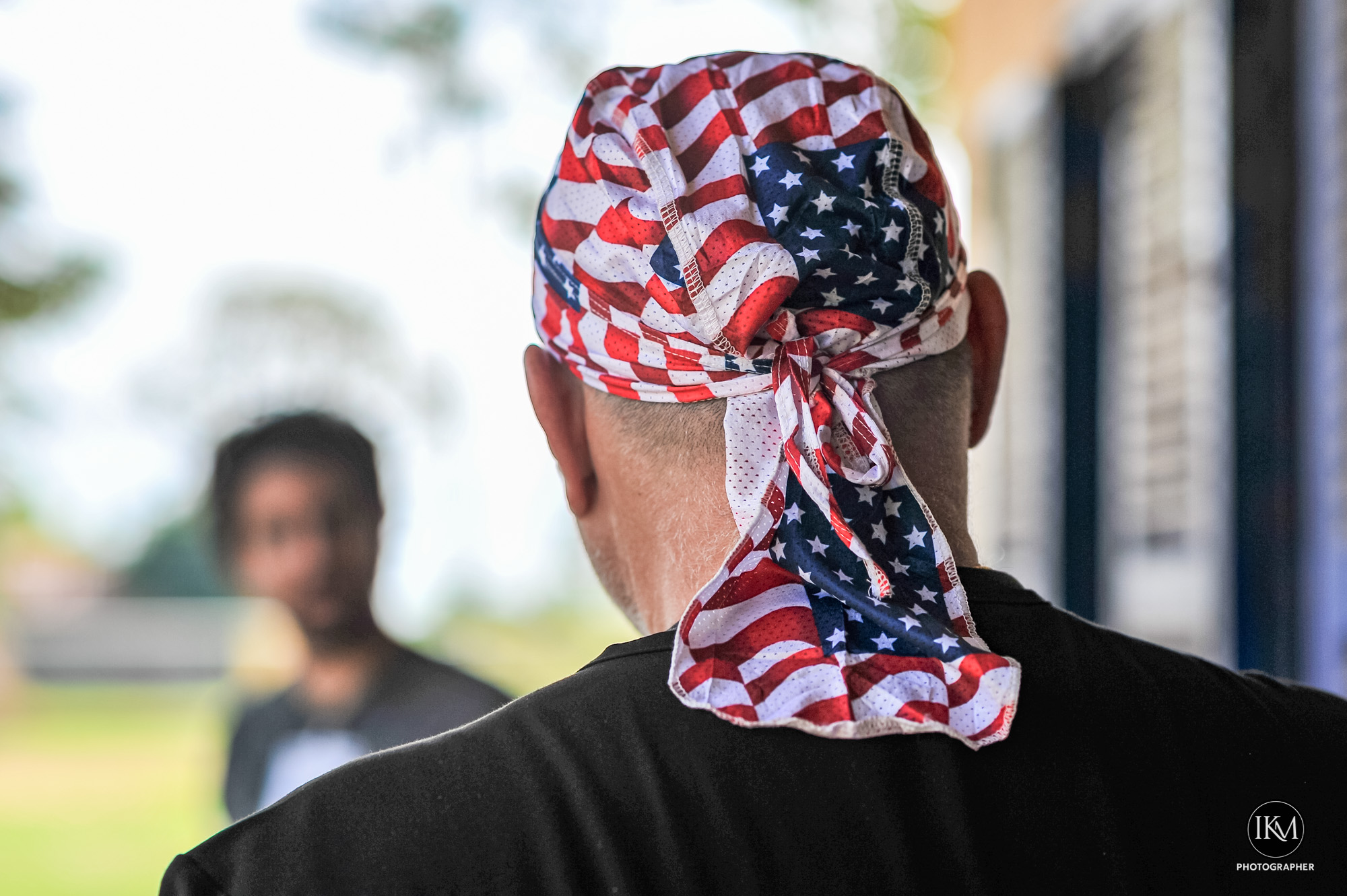





📷 How to Achieve Bokeh
- Use a fast lens (e.g., 50mm f/1.8 or 85mm f/1.4).
- Shoot wide open (lowest f‑stop).
- Get close to your subject while keeping the background far away.
- Include point light sources (fairy lights, street lamps) for visible bokeh balls.
🎨 Creative Uses
- Portraits: Isolate faces against dreamy backgrounds.
- Street Photography: Neon signs and traffic lights become artistic bokeh.
- Nature: Flowers or leaves blurred into soft color washes.
⚠️ Things to Watch Out For
- Overdoing bokeh can make images look gimmicky.
- Cheap lenses may produce “busy” or distracting bokeh.
- Not all situations benefit—sometimes context in the background is important.
👉 In short: bokeh is about the quality of blur, not just the amount. It’s a creative tool to direct attention and add atmosphere.
Exposure mistakes are some of the most common frustrations for beginners—and the good news is, your camera tells you when you’ve made them if you know how to read the signs. Let’s break it down:
❌ Common Exposure Mistakes (and How to Read Them)
- Overexposure (Too Bright)
- Symptoms in the photo: Washed‑out highlights, white skies with no detail, pale skin tones.
- Histogram clue: Graph bunched up on the right side.
- Fix: Lower ISO, use faster shutter speed, or stop down aperture (higher f‑number).
- Underexposure (Too Dark)
- Symptoms in the photo: Loss of shadow detail, muddy blacks, subjects hard to see.
- Histogram clue: Graph bunched up on the left side.
- Fix: Raise ISO, slow down shutter speed, or open aperture (lower f‑number).
- Blown Highlights
- Symptoms: Bright areas (like clouds or reflections) turn pure white with no texture.
- Histogram clue: Spike at the far right edge.
- Fix: Use exposure compensation (-EV), or meter for the highlights.
- Crushed Shadows
- Symptoms: Dark areas lose detail, becoming solid black.
- Histogram clue: Spike at the far left edge.
- Fix: Increase exposure slightly (+EV), or use fill light/reflectors.
- Mixed Lighting Confusion
- Symptoms: Correct exposure in one part, but another part is too bright/dark.
- Histogram clue: Spread across both ends, with gaps in the middle.
- Fix: Spot meter on your subject, or bracket exposures.
- Relying Only on the LCD
- Mistake: Judging exposure by how the photo looks on the screen (which can be misleading in bright sunlight).
- Better: Always check the histogram—it’s the most reliable exposure reading.
🔎 Quick Reading Drill
- Take a photo in bright daylight → check histogram (likely right‑heavy).
- Take a photo indoors with no flash → check histogram (likely left‑heavy).
- Adjust one setting at a time until the histogram is balanced (spread across the middle without clipping at edges).
👉 Exposure isn’t about “perfect brightness”—it’s about controlling detail in highlights and shadows. Once you learn to read the histogram, you’ll stop guessing and start shooting with confidence.
Exposure mistakes happen when one part of the exposure triangle (aperture, shutter speed, ISO) is set without balancing the others—or when the camera’s meter is misled by tricky lighting. Let’s break down the most common errors and why they occur:
🧪 Exposure Mistakes and Why They Happen
- Overexposure (Too Bright)
- Why it happens:
- Aperture too wide (f/1.8 in bright daylight).
- Shutter speed too slow (1/30s outdoors).
- ISO too high (ISO 1600 in sunlight).
- Meter fooled by dark subjects (camera brightens too much).
- Result: Washed‑out highlights, white skies, pale skin tones.
- Underexposure (Too Dark)
- Why it happens:
- Aperture too narrow (f/16 indoors).
- Shutter speed too fast (1/1000s at night).
- ISO too low (ISO 100 in dim light).
- Meter fooled by bright subjects (camera darkens too much).
- Result: Muddy shadows, loss of detail, subjects hard to see.
- Blown Highlights
- Why it happens:
- Bright areas (clouds, reflections, neon lights) exceed sensor’s dynamic range.
- Camera exposes for shadows, sacrificing highlight detail.
- Result: Pure white patches with no texture.
- Crushed Shadows
- Why it happens:
- Dark areas fall below sensor’s dynamic range.
- Camera exposes for highlights, sacrificing shadow detail.
- Result: Solid black areas with no recoverable detail.
- Mixed Lighting Errors
- Why it happens:
- Scene has extreme contrast (bright window + dark room).
- Meter averages exposure, leaving both highlights and shadows compromised.
- Result: One part of the image looks fine, the other is unusable.
- Trusting the LCD Instead of the Histogram
- Why it happens:
- LCD brightness varies depending on environment.
- In sunlight, photos look darker than they are; indoors, brighter.
- Result: Misjudged exposure decisions.
🔎 How to Read Exposure Mistakes
- Histogram:
- Bunched left = underexposed.
- Bunched right = overexposed.
- Spikes at edges = clipping (lost detail).
- Light Meter:
- Needle left = too dark.
- Needle right = too bright.
- Centered = balanced exposure (though not always “perfect” artistically).
👉 In short: exposure mistakes happen when light, subject, and settings aren’t balanced. The histogram is your best truth‑teller—it shows whether you’re losing detail in highlights or shadows.

























 a world without pictures is like coffee without cream and sugar, bitter